Free AI
Dating Photos
Upload one selfie. Get a natural photo for Tinder, Bumble and Hinge in about 10 seconds. One free photo per person: full HD, no watermark, no email, no card.
Get the best result
- Face a window or bright light — avoid harsh light from above.
- Plain wall behind you, no clutter.
- Solid colors photograph best.
- Slight smile, relaxed face, eyes on the lens.
- Head and shoulders in frame.
- Your photo is deleted from our servers right after your headshot is made.
Want more than one photo? Get 5 dating photos in 4K for $4.99, paid once.
How It Works
A clear selfie of just you works best.
Choose the clothes and the background you like.
Your photo for dating apps is ready in about 10 seconds.
What AI Dating Photos Look Like
Examples made with Headshotsly, each from one photo of the person. Same face, better light, new clothes and a new background.
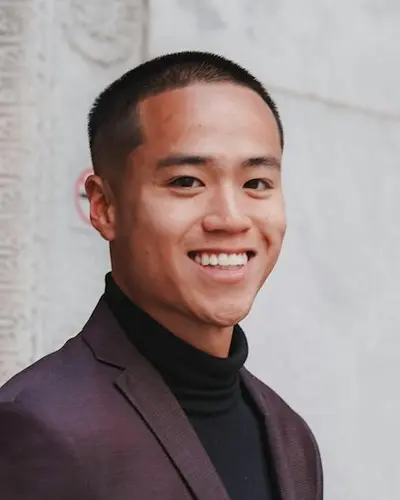
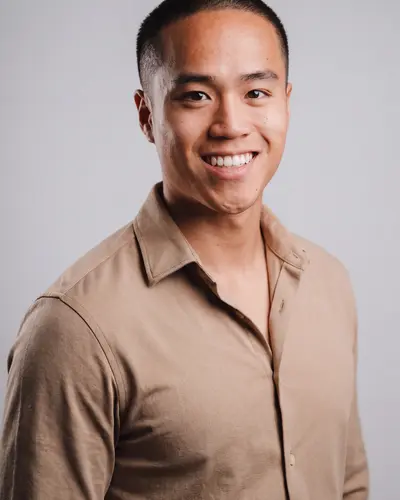
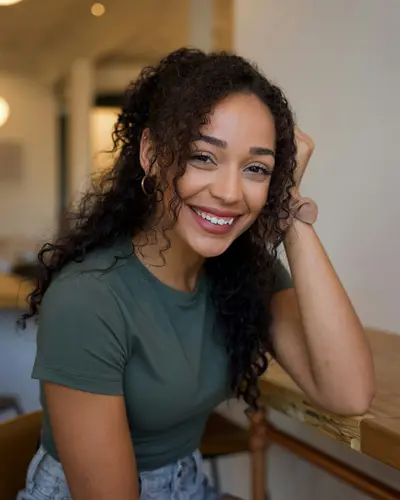
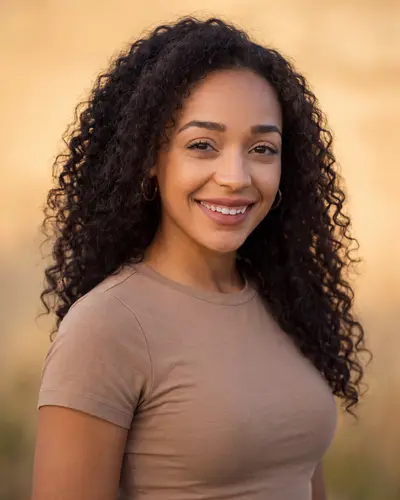
Look at what did not change: their faces. The AI keeps the person's face and only changes the light, the clothes and the background.
How to Get AI Dating Photos for Free
Upload one clear selfie above. Pick one of four styles and one of three backgrounds. Then download your photo. You get one free AI dating photo per person: full HD, no watermark, no signup and no credit card.
Why only one? Every photo is made new for you, and that costs us money. So we give you one free photo and tell you up front that the paid pack costs $4.99 for 5 photos.
One free photo is enough to see the most important thing: does it look like you? You find out before you pay anything.
A Free AI Photo Generator for Tinder, Hinge and Bumble
The free photo works on any dating app. Each app sets its own photo rules, so here is what each one says on its own help page, and where your free photo fits.
Tinder's help page: In many places your profile needs at least one photo that shows your face: clear, well lit, close up, with nothing covering it.
Your free photo shows your face, so it can be that photo. Tinder gives no pixel size; the cropper has a tall crop we suggest.
Hinge's help page: A profile has four to six photos, depending on where you live, plus three prompt answers. Top Photo puts the photo most likely to get a Like first.
Use the free photo as your face photo, then add photos of you doing things you enjoy. Hinge gives no pixel size either.
Bumble's help page: You can add up to six photos and videos, and four to six work best. Best Photo puts your most popular photo first. Bumble asks for 1024 x 1024 pixels if you can.
The cropper has Bumble's own 1024 x 1024 square, so your free photo fits without your face being cut.
To fit the photo to each app, use the free Dating Photo Cropper. To pick which photo goes first, try the Photo Order Optimizer, and read the best first photo for a dating profile. Hinge and Bumble ask for more than one photo. For a full set, our AI photos for dating apps come as a pack: $4.99 for 5 photos, in 4K, in different outfits and settings.
App rules change and can differ by country. If something here does not match what the app shows you, go by the app.
Which Style Works on Which Dating App
Each of the four styles fits a different kind of profile photo.
A clean T-shirt in good light looks friendly and relaxed. It is an easy first photo on an app where people decide fast.
A neat shirt shows a little effort. It is the look of dinner with friends: tidy, but not too formal.
If your profile says you like hiking, running or the gym, one sporty photo matches what you wrote.
A strong look, but a risky first photo. Use it later in your profile to show a different side of you.
The Selfie You Upload Decides the Photo You Get
The AI keeps your real face. It cannot show details it cannot see, so take a minute to get a clear selfie:
- Face a window. Daylight is the best light.
- Hold the phone at eye level, arm's length
- Just you in the frame, face fully visible
- Use a recent photo. The AI keeps your face as it is.
- Sunglasses, caps, or anything hiding your face
- Group photos. The AI needs to know which person is you.
- Dim bar lighting or harsh overhead light
- Heavy filters. They hide the details the AI needs.
Free vs. Paid AI Dating Photos, Honestly
We sell the paid pack, so we want to be clear. Here is the real difference:
| Free (this page) | Paid pack | |
|---|---|---|
| Price | $0 | $4.99 for 5 photos |
| Photos | 1 per person | 1 photo per credit |
| Resolution | Full HD | Up to 4K |
| Watermark | None | None |
| Guarantee | It's free | 14-day satisfaction guarantee |
Both keep your face the same way. The free photo is a real sample. The pack is for a full set of profile photos.
Want More Than One Photo?
Hinge asks for four to six photos, and Bumble says four to six work best. A good set starts with a clear photo of your face, then photos of you doing things you enjoy.
Our AI dating photo generator makes 5 photos in 4K, in different outfits and settings. See dating photo examples first, or read our honest answer to do AI dating photos work.
The Rest of Your Profile, Also Free
The photo is step one. These free tools help with the rest of your profile. None of them needs a signup.
Score your current photo out of 100 for light, warmth and sharpness.
Figure out which photo should lead your profile and which should go last.
Find problems like sunglasses or group photos before you upload.
Crop to each app’s exact dimensions so faces don’t get cut off.
Write a short bio to go with your photos. Free.
Frequently Asked Questions
Free Photo Tools
Professional tools that run 100% in your browser — your photos never leave your device.
Need a photo for work or a job application? Try our free LinkedIn headshot generator