Best First Photo for a Dating Profile (and What Goes Next)
The best first photo for a dating profile is simple: just you, face clearly visible, in daylight, looking at the camera, from about the chest up.
That's it. Not your best adventure, not your funniest moment, not the group shot where you look great but three other people also look great. Those come later.
The first photo has one job: let someone see who you are in one glance. Everything below is about doing that job well, then ordering the rest so your profile tells a small story.
What a good first photo looks like
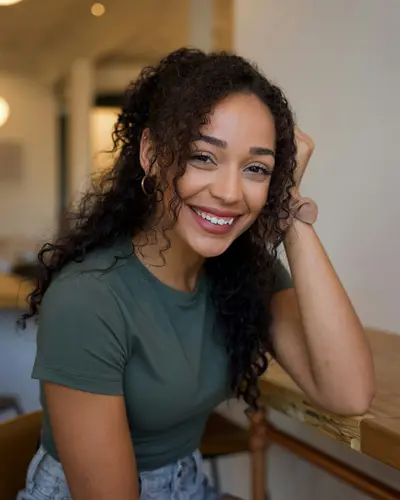
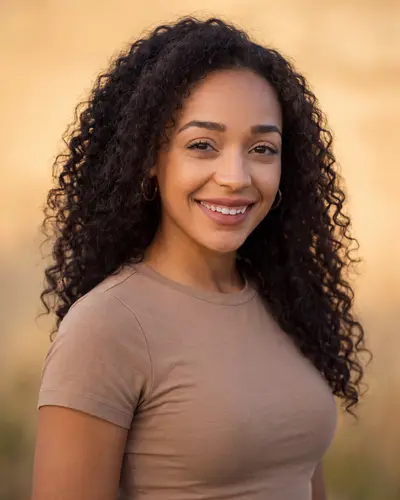
An example made with Headshotsly: an indoor photo becomes a clear, warm outdoor photo of the same face. That's the kind of photo that belongs in slot one.
The first-photo checklist
Run your current first photo through this list. If it misses two or more, swap it.
- Only you in the photo. No friends, no exes cropped out, no 'guess which one'.
- Your face is easy to see: no sunglasses, no hat brim shading your eyes, no mask.
- Daylight or bright, soft light. Window light counts. A dark bar does not.
- You're looking at the camera, or very close to it.
- Chest-up or shoulders-up, so your face fills a good part of the frame.
- Recent. It should look like you today, not you five haircuts ago.
- Tall, not wide. Apps show photos in a portrait shape, so wide photos get cut.
Why the first photo matters more than the rest
On most apps, your first photo is what people see before they decide to look further. If it's dark, far away or crowded, many people never get to your good photos.
That's not shallow, it's just how a quick scroll works. The first photo answers 'what does this person look like?' The rest answer 'what are they like?'
So your most interesting photo is often a bad first photo. The photo of you on a mountain is great, but if you're a small dot on the mountain, put it third.
What the apps themselves say
The apps' own help pages agree with the checklist, and they say it in plain words.
Tinder asks for at least one face photo in many countries, and hides profiles where it can't find one. Its idea of a good face photo: a clear view of your full face, well lit, close-ups best, nothing covering it like a mask, your hand or your phone.
Bumble's photo tips ask for bright, well-lit photos where your face is clearly visible, and say to avoid heavy filters or overly edited pictures. You can add up to six photos and videos, and Bumble says four to six work best.
Hinge asks every member for between four and six photos, depending on where you live, plus three prompt answers.
When the app picks your first photo
Hinge and Bumble both have an optional setting that reorders your photos for you. Hinge calls it Top Photo: it tests your photos and puts the one most likely to get a Like first. Bumble calls it Best Photo: it puts your most popular photo first.
With either one turned on, the order other people see can be different from the order you set. So any of your photos could end up in slot one.
That changes the advice a little. If you use these settings, every photo on your profile should pass the checklist above, not just the first one. A blurry group shot is a risk if the app might lead with it.
How to take a good first photo yourself
You don't need a photographer. You need good light, a calm background and enough tries to get one you like.
- Go outside in the late afternoon, or stand facing a big window. Light should hit your face, not come from behind you.
- Find a simple background: a wall, trees, a quiet street. Stand a few steps in front of it so it goes soft.
- Hold the camera at eye level, or a touch above. From below is the angle nobody likes.
- Ask a friend, or prop your phone up and use the timer. Arm's-length selfies make your face look wider than it is.
- Take lots. Move a little between shots, laugh at something, look away and back. Most of them will be bad, and that's normal.
- Keep it in portrait mode, so the app doesn't have to cut off the sides.
Crop it so your face fills the frame
A good photo can still be a weak first photo if you're small in it. Crop in so your head and shoulders fill a good part of the frame, and keep a little space above your head.
Tinder and Hinge don't publish a pixel size for profile photos. Bumble's help page says photos should ideally be 1024 x 1024 pixels. Our free dating photo cropper has a tall crop we suggest for Tinder and Hinge, and Bumble's own square size, and it runs in your browser.
The order for photos 2 to 6
Once the first photo is right, use the next slots to fill in the picture. A simple order that works for most people:
- Photo 2: full-length. Same honesty as photo one, now head to toe, in clothes you actually wear.
- Photo 3: doing something you enjoy. Cooking, climbing, playing music, walking the dog.
- Photo 4: a social photo where you're easy to find. One is plenty.
- Photo 5: a different setting or season, so it doesn't look like one afternoon.
- Photo 6 (optional): something that starts a conversation. A pet, a hobby, a place.
Common first-photo mistakes
These show up again and again, and every one of them is easy to fix.
- The group shot first. People have to work out which one is you. Many won't.
- The car selfie. Harsh light from one side, a seat belt and a headrest. Everyone has one.
- Sunglasses. Your eyes are the main thing people want to see.
- The heavy filter. It hides your skin and makes the photo look older than it is.
- The very old photo. It sets up a surprise on the first date, and not the good kind.
- The cropped wedding photo. You can tell. Everyone can tell. There's half a shoulder.
Let a tool pick the order
If you have several photos and can't decide, our free Dating Photo Order tool scores them and sorts them for you. It looks at brightness, warmth, contrast, background, size and shape. Photos that score 85 or more are marked as a good main photo; 75 or more as good for slots two and three.
It runs in your browser, so your photos aren't uploaded. It also doesn't rate your looks. It measures the photo, which is the part you can change.
For a single photo with more detail, the Photo Rater gives a score per category, and the Red Flag Checker lists anything that would hurt it, like being too dark or too small. Our dating photo analyzer guide explains what each score means.
No good first photo? Make one
Lots of people don't have a single photo that passes the checklist. That's normal: most of our photos are taken by friends at night, or are selfies at arm's length.
Two options. Ask a friend to take a few photos outside in the late afternoon, facing the light. Or use an AI dating photo made from your own selfie, which keeps your face and fixes the light and background.
Headshotsly makes AI dating photos: 5 photos in 4K for $4.99, one time, with settings like golden hour, a park, a cafe or a city street. You can try one free AI dating photo first, in full HD with no watermark. Whatever you pick, keep it looking like you today.
Picking which AI photo goes first
If you make AI photos, you'll have several to choose from. Use the same checklist, plus a few checks that only matter for AI photos.
- Put each result next to a recent real photo of you. Keep only the ones a friend would call "you" without a second look.
- Look at the small things: ears, teeth, hairline, glasses, hands. Skip any photo where one of them looks off.
- Pick a natural expression over a perfect one. A small real smile beats a big stiff one.
- For slot one, choose the plainest setting and the brightest light. Save the cafe or city photo for slot three or five.
- Mix them with real photos: one or two AI photos on the whole profile is plenty. Our guide do AI dating photos work? explains why.
Frequently Asked Questions
A recent photo of just you, face clearly visible, in daylight, looking at the camera, from about the chest up. Save group shots and action photos for later slots.
A natural smile usually works well because it looks relaxed and friendly. The main thing is that it looks like you, so skip a forced grin.
Yes, if it's well lit, taken at eye level and not too close. Arm's-length selfies from below or in a car are the ones to avoid.
No. People have to guess which one is you. Use one group photo later in your profile, where you're easy to find.
Only if it looks like you today. A photo made from your own selfie that keeps your face as it is shows the real you. Check the rules of the app you use, since they differ and change.
Related Pages
Sort your photos in a minute
Drop your photos into the free Dating Photo Order tool and see which one should go first. Nothing is uploaded.