Do AI Dating Photos Work? An Honest Answer
Yes, when they still look like you. No, when they don't. That's the whole answer, and the rest of this article is the detail behind it.
An AI dating photo made from your own selfie can fix the things that make most profile photos weak: bad light, a messy room, old photos, no photo of just you. It can't make you someone else, and trying to is where it goes wrong.
We make AI dating photos, so read this knowing that. We'd still rather you use them well or not at all than have a bad first date because of a photo.
What 'looks like you' means
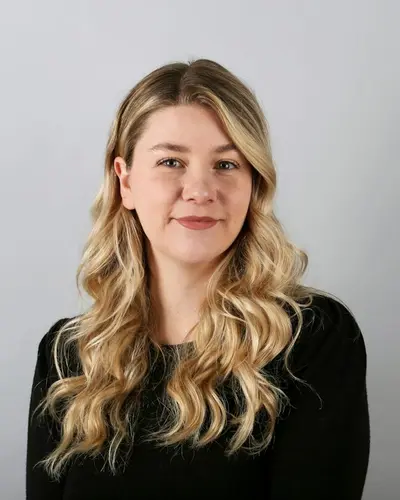
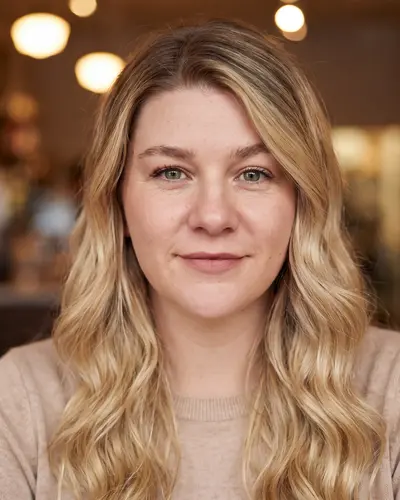
Examples made with Headshotsly. The face, age and build stay the same as the original photo. The light, clothes and setting change.
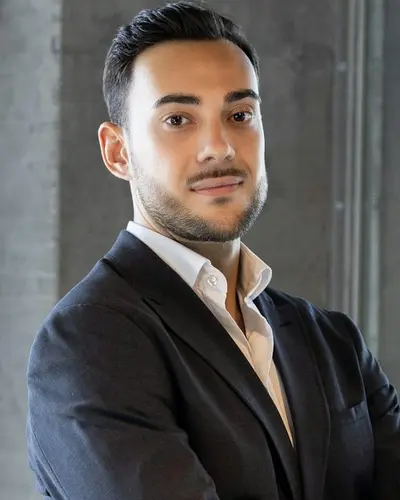
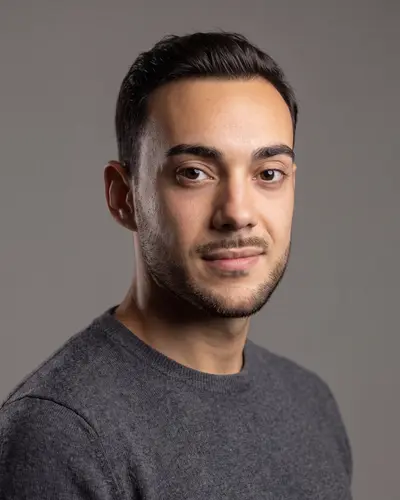
Same face, better setting
A photo against a plain wall, turned into a warm cafe photo of the same person.
What AI dating photos are good at
Most people don't have bad faces. They have bad photos. The problems are almost always technical, and that's exactly what AI fixes well.
- Light: turning a dim indoor selfie into a photo that looks like soft daylight
- Background: swapping a messy room or a car seat for a cafe, a street or a park
- Clothes: putting you in a clean shirt or sweater instead of whatever you had on
- Recency: giving you a current photo when your best one is from years ago
- Solo shots: a clear photo of just you, when all your good ones are group photos
When they backfire
The problem starts when the photo stops being you. A slimmer face, a younger face, a sharper jaw, different hair: all of it gets noticed the moment you meet.
It also backfires when the whole profile is AI. Six perfect photos in six perfect places can look like a stock catalogue. People trust a profile more when it looks like a real life.
And it backfires when the setting is a fantasy. A yacht you've never been on starts a conversation you can't finish.
How to use them well
The rule we'd give a friend: AI for the photos you're missing, real photos for everything else.
- Use one or two AI photos, mixed with recent real ones
- Pick everyday settings: a cafe, a city walk, a park, a trail
- Pick clothes you'd actually wear on a date
- Upload a clear, recent selfie so the result matches you today
- Skip any result that doesn't look like you, even if it looks nice
Give it better selfies, get a photo that looks more like you
Most "it doesn't look like me" results start with the selfie. An AI photo can only keep what it can see. A dark, blurry or side-on selfie leaves it guessing, and guesses are where the face drifts.
With Headshotsly you can add up to five selfies of yourself in one go. They all go in together, so the AI sees your face from more than one angle. Two to four selfies from different angles usually beat one.
- Face the light: a window in front of you, not behind you
- No sunglasses, no hat brim over your eyes, nothing in front of your face
- Take them at eye level, from arm's length or further, not from below
- Mix straight-on and slightly turned to each side
- Use recent photos only: same hair, same glasses, same beard as today
- Only you in the photo; crop out anyone else before you upload
How to pick the results worth keeping
You'll usually get more photos than you need. That's the point: you pick the few that are really you and leave the rest.
- Put each result next to a recent real photo. If it takes you a second look to see yourself, skip it.
- Check the small things: ears, teeth, hairline, glasses frames, moles, hands. Small changes there are what make a photo feel "off".
- Check the setting makes sense: the light on your face should match the light behind you.
- Ask a friend which ones look like you. They're better at this than you are.
- If a photo is nearly right, you can change one thing with Refine (1 credit per photo) instead of starting over.
What the apps ask for
The apps' own help pages are a good test for any photo, AI or not.
Tinder asks for at least one face photo in many countries: a clear view of your full face, well lit, nothing covering it. Bumble asks for bright, well-lit photos where your face is clearly visible, and says to avoid heavy filters or overly edited pictures. Hinge asks for four to six photos, depending on where you live, plus three prompt answers.
Notice the words they use: clear, bright, visible, real. Nobody asks for perfect. An AI photo that fixes your light and keeps your face fits that. One that smooths your skin to plastic or changes your face doesn't.
Are AI dating photos allowed?
Dating apps ask that your photos show you. A photo made from your own selfie that keeps your face as it is does that. A photo of someone else, or one changed so much it no longer looks like you, doesn't.
Every app has its own rules and they change, so check the app you use. We won't tell you apps can't tell, because that's not the point. The point is that the person who shows up matches the photo.
Where an AI photo fits on your profile
A good mix for most people: a clear face photo first, a full-length photo, a photo doing something you enjoy, and one social photo. An AI photo fits best in the slots you're missing, usually the clear face photo or a photo in a nicer setting.
Our guide to the best first photo for a dating profile covers the order slot by slot. If you're also stuck on the words, the AI dating profile generator guide covers bios and prompts.
When you've picked, the free dating photo cropper cuts each photo to a clean shape for Tinder, Hinge or Bumble.
Will they get me more matches?
Nobody can honestly promise that, and we don't. Matches depend on a lot of things: where you live, which app, your bio, who's online that week.
What a better photo does is remove a reason to swipe past you. A dark, blurry or crowded first photo loses people before they read anything. A clear, recent photo of your face at least gets you a fair look.
What it costs, and how to try it
With Headshotsly you upload one selfie and get photos in about two minutes. The pack is 5 photos in 4K for $4.99, one time, no subscription.
You can make one free AI dating photo first, in full HD with no watermark, to see whether it looks like you. Be fair to it and to yourself: the free photo is made from one selfie in one of four styles. The paid photos use the same model with up to five selfies, more settings and full 4K. Still, if the free one is nowhere near you, don't buy the pack. That's what the free photo is for.
Not sure your current photos are the problem? Run them through our free Photo Rater first. It measures light, warmth, clarity, background, framing and colour in your browser, so you can see what to fix before changing anything. Our dating photo analyzer guide explains each score.
Ready to try the full pack? See the settings and examples on our AI dating photos page.
Frequently Asked Questions
Good ones made from your own selfie look like you on a good day. They look fake when the face is changed or the setting is unlikely. Always pick results that match how you look today.
One or two, mixed with recent real photos. A profile made only of AI photos can look too polished to trust.
Maybe, and that's fine if the photo shows the real you. What matters is that you look like your photos when you meet.
They shouldn't, and ours keep your face as it is. Using a photo that changes how you look sets up a bad first meeting.
Yes. Our free dating photo tool makes one full HD photo from your selfie, with no watermark. The full pack is 5 photos in 4K for $4.99.
Related Pages
See if it looks like you
Make one free AI dating photo from your own selfie. If it doesn't look like you, you've lost nothing.