LinkedIn Profile Picture Mistakes (and Easy Fixes)
Quick answer: the biggest LinkedIn profile picture mistakes are a photo that doesn't look like you today, a face too small to read, a cropped party or wedding shot, a busy background, and heavy filters. Each one has a fix that takes less than an hour.
Your photo is the first thing people see next to your name: in search results, in comments, in a recruiter's list. It's shown small most of the time, which makes some mistakes worse than they'd be on a big screen.
Here are nine mistakes, why they hurt, and what to do instead. Some come straight from LinkedIn's own rules.
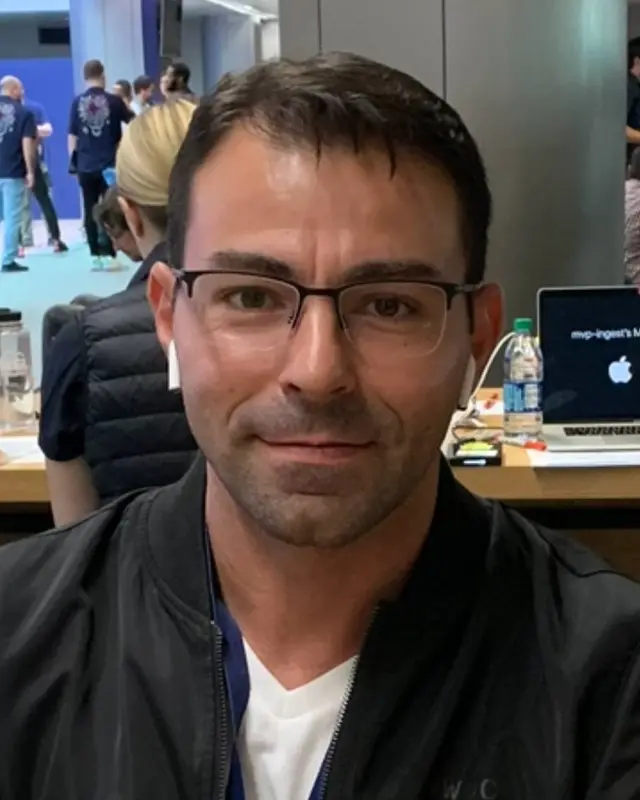
From an event snapshot to a profile photo
Example made with Headshotsly from one real selfie taken at a busy event. The blazer and plain gray background were picked in the style.

1. A photo that isn't really you (LinkedIn's rule)
LinkedIn's help page on profile photos says: "Your profile photo must reflect your likeness." An illustration or other artistic version of you is allowed. A logo, an emoji, a landscape, your pet, a flag, a childhood photo, or anyone else's face (stock photos and celebrities included) can be removed.
So the first mistake isn't about style. A team logo or your dog will get you nowhere, and LinkedIn may take it down.
2. A photo from years ago
If someone meets you on a video call and does a double take, the photo has stopped doing its job. Hair, glasses, weight and age all change, and people notice the gap.
Fix: use a photo that looks like you do now. Our guide on how often to update your headshot has a two-minute check.
3. Your face is too small
LinkedIn shows your photo as a small circle in most places. A full-body shot or a photo with lots of sky around you becomes a tiny figure nobody can recognize.
Fix: crop so your head and the top of your shoulders fill most of the frame. Leave a little space above your head so the circle doesn't cut it off.
4. A crop from a party or a wedding
You look great in it, which is why you picked it. But there's usually a stranger's shoulder at the edge, a drink in your hand, or lighting that says Saturday night. It also tends to be low resolution after the crop.
Fix: use a photo taken of you, alone, on purpose.
5. A busy or messy background
A kitchen, a bookshelf full of colors, a crowd, a car interior. If the eye goes to the background first, the photo is working against you.
Fix: a plain wall, a softly blurred office, or a simple outdoor background. See how to pick a background color.
6. Heavy filters and beauty apps
Smoothed skin and strong color effects look fine on a social app. On LinkedIn they make people wonder what you really look like, and the meeting in person makes the gap obvious.
Fix: natural color, light editing at most.
7. Bad light: too dark, or hard shadows
A dark photo looks tired; harsh overhead light gives dark circles under the eyes. Both are the light, not your face.
Fix: face a window in daylight. It's the cheapest good light there is. Our guide to taking a headshot with your phone walks through it.
8. Dressed for a different job
A tuxedo for a software engineer, a gym top for a lawyer. People read your clothes before they read your title.
Fix: wear what you'd wear to an important day in your job, one small step smarter. More in what to wear for a headshot.
9. No photo at all
LinkedIn's help page puts it simply: a photo helps people recognize you. An empty circle gives them nothing to recognize.
Fixing it without a photo shoot
If you don't have a good photo, an AI headshot made from your own selfie keeps your face (which is what LinkedIn's likeness rule is about) and changes the outfit, light and background. 5 photos cost $4.99, paid once, ready in about 2 minutes. Start with one free photo on the free headshot generator, or see LinkedIn headshots.
Frequently Asked Questions
LinkedIn's help page says your profile photo must reflect your likeness; an illustration or artistic version of you is allowed. Logos, emojis, landscapes, animals, words, flags, childhood photos and other people's images may be removed.
LinkedIn's rule is about likeness: the photo must look like you. An AI headshot made from your own selfie that looks like you fits that. One that doesn't look like you is the mistake. See are AI headshots OK for LinkedIn.
A natural, relaxed smile usually reads as friendly and confident. A forced grin or a stern stare both look stiff. Go with how you look when you meet someone you like.
See our LinkedIn photo size guide for the numbers. In short: start from a big, sharp file and crop it square.
Only if the crop is clean and sharp, with nobody else's shoulder or hair in it. A photo taken of you alone is almost always better.
Related Pages
Swap the old photo this afternoon
One free photo from your selfie, then 5 in 4K if you like it.