Are AI Headshots OK for LinkedIn? What the Rules Say
Quick answer: yes, an AI headshot is OK on LinkedIn as long as it looks like you. LinkedIn's help page says your profile photo "must reflect your likeness", and it allows an illustration or artistic rendering of yourself. What it doesn't allow is someone else's face, stock photos, logos and the like.
So the real question isn't 'AI or camera?' It's 'would someone recognize me from this?' Here's how to make sure the answer is yes.
Full disclosure: we make AI headshots, so we have a stake in this. Everything below about LinkedIn comes from LinkedIn's own help page, which we link to in the FAQ.
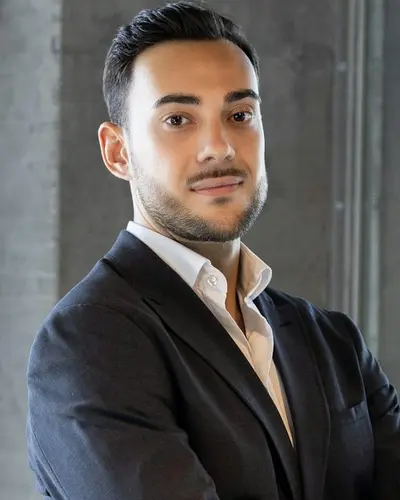
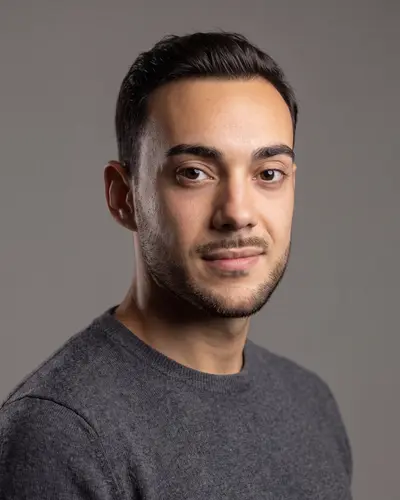
Same face, new setting
Example made with Headshotsly from one photo of a young man in a dark suit. The sweater and gray background are new; the face is his.
What LinkedIn's rule actually says
LinkedIn's help page on profile photo guidelines says: "Your profile photo must reflect your likeness. You can use an illustration, caricature, or other artistic rendering of yourself."
It then lists photos it may remove: company logos, emojis, landscapes, animals, words or phrases, flags, childhood or baby photos, and other people's likenesses, including stock imagery, celebrities and fictional characters.
Nothing on that page bans AI. The line it draws is about whose face it is.
When an AI headshot is fine
- It's made from your own photos, and it looks like you today.
- Your face shape, skin tone, hair and age are your own.
- Someone who knows you would say 'nice photo' rather than 'who's that?'
- It shows you dressed the way you actually dress for work.
When it isn't
- It made you look ten years younger, thinner, or like a different person.
- It changed your skin tone, eye color or features.
- It's a face generated from nothing, not from you. That's someone else's likeness, which LinkedIn says it may remove.
- Obvious AI errors: odd ears, warped glasses, extra fingers if your hands are in the shot.
Do you have to tell people it's AI?
LinkedIn's photo guidelines page doesn't ask you to label how the photo was made. What matters there is likeness.
Some employers, schools or professional bodies have their own rules for official photos (ID badges, passports, some applications ask for unedited photos). Those are separate from LinkedIn; check them when they apply.
How to pick the right AI headshot
Make a few and choose carefully. Put the candidates next to a recent normal selfie and compare: eyes, nose, smile, hairline. Pick the one that looks most like you, not the one that looks most like a model.
Then show it to someone who sees you often. If they recognize you instantly, it's the one.
How we keep it looking like you
Headshotsly makes each photo from your own selfie, keeps your face, and changes the outfit, light and background you pick. Adding two to four selfies from different angles makes the result closer to you. If a photo doesn't look like you, don't use it.
5 photos cost $4.99, paid once, ready in about 2 minutes, and you can see one free photo before you pay on the free headshot generator. For LinkedIn styles, see LinkedIn headshots.
Frequently Asked Questions
LinkedIn's help page says your profile photo must reflect your likeness, and it allows an illustration or artistic rendering of yourself. An AI headshot made from your photos that looks like you fits that. A face that isn't yours doesn't.
Yes. Its help page says it may remove photos of logos, emojis, landscapes, animals, words, flags, childhood photos or other people's likenesses, including stock images.
If it looks like you and has no obvious AI errors, it reads as a professional photo. If it doesn't look like you, the first video call will show it, which is worse than any old photo.
Not if it shows your real face as it is today. It's closer to choosing good light and a nice background than to wearing a mask. Making yourself look like someone else would be dishonest.
On LinkedIn's help center, in the article "Profile photo guidelines and conditions". We read it on 2 October 2026.
Related Pages
Check the likeness yourself
Make one free photo from your selfie. If it doesn't look like you, you've lost nothing.