Free AI Headshot Generator for LinkedIn: What's Really Free
You searched for a free AI headshot generator for LinkedIn, clicked three tools, and every one asked for your credit card before showing you anything.
So let's be straight about it: what does 'free' actually get you in 2026, how do you generate a genuinely free LinkedIn headshot in about two minutes, and when is it smarter to spend $4.99?
This is written by a company that sells headshots, so keep that in mind. But the free option below is real, works without a card, and you can leave with your photo.
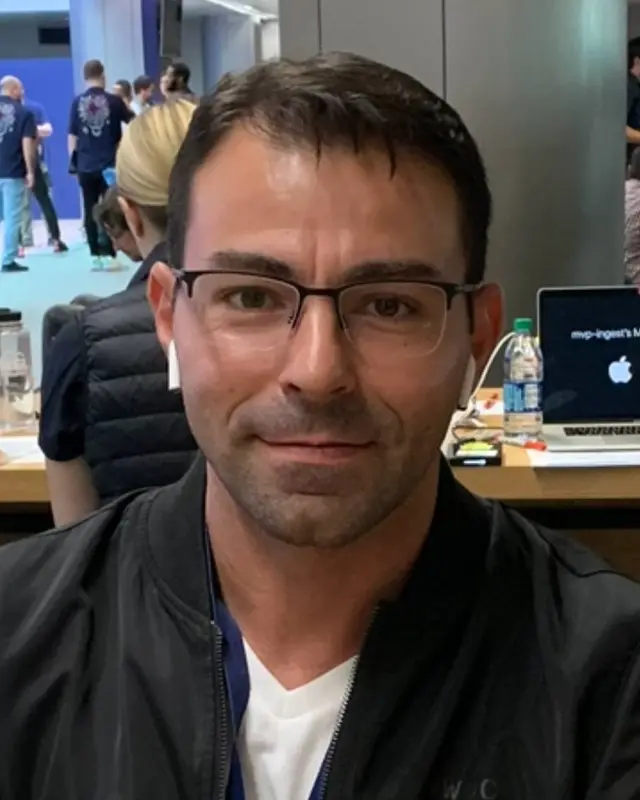
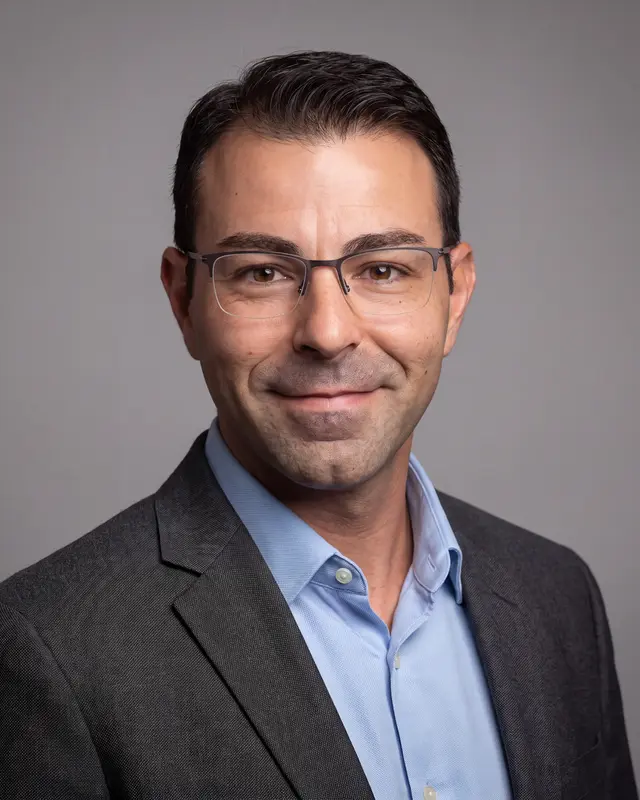
What one selfie turns into
Example: one phone selfie taken at a busy event, and the LinkedIn headshot Headshotsly made from it (charcoal blazer, gray background). The free tool makes one photo like this in full HD, with no watermark, before you pay anything.
What 'free' usually means in AI headshot tools
Almost every 'free AI headshot generator' falls into one of three buckets:
- Free trial, card required — you'll be charged if you forget to cancel. Not free, just patient.
- Free credits after signup, watermarked results at low resolution — free-ish, and honestly fine for testing
- Actually free, no card, no watermark — rare, but it exists (ours is one)
How to get a free LinkedIn headshot in 2 minutes
Our free LinkedIn headshot generator works like this: you upload one selfie, pick a style, such as a LinkedIn suit, a CV blazer or smart casual, and a background, and about 10 seconds later your headshot shows on the page. No card and no account.
The free photo is full HD with no watermark, so you can judge whether it looks like you on a good day, and use it if it does.
Two honest tips for better results: use a well-lit photo taken at eye level, and skip sunglasses and heavy filters. The AI can change your outfit, but it can't fix a dark or blurry face. More in how to take a headshot with your phone.
Using a free LinkedIn headshot generator: what you pick and what you get
On our free LinkedIn headshot generator you make three choices, and that's all.
- Your photo: one selfie, facing the camera. A phone photo is fine.
- A style: LinkedIn (professional suit), CV / Resume (formal blazer) or Social Media (smart casual).
- A background: White, Gray or Cream.
- Then press generate. The photo is ready in about 10 seconds, in full HD with no watermark. When you download it, we ask where to email it. You get one free photo per internet connection.
Will the free photo work on LinkedIn?
LinkedIn asks for at least 400 x 400 pixels, so the full HD free photo is big enough to upload, and it has no watermark. Exact sizes for LinkedIn and other places are in our LinkedIn photo size guide.
Paid photos are 4K. In the app you pick from Navy Suit, Charcoal Suit, Blazer, Smart Casual or Sweater, on Clean Gray, Pure White, Light Blue, Modern Office or City Street. Each run makes up to 4 photos in about 2 minutes, and the gallery's Crop button saves a square 1200 x 1200 copy for LinkedIn. More looks are on our LinkedIn headshots page; $4.99 gets 5 photos, paid once (pricing). Every free option we have is on try one free.
Free vs paid: the actual difference
The free photo is made with the same image model as paid photos, from one selfie, in one of three styles. Paid photos add 4K Ultra HD resolution, up to 5 selfies (they look more like you), and every combination of attire, background, expression, and accessories — plus photos of you at work, like at a desk or in a meeting.
The paid math is simple: $4.99 for 5 photos, paid once, no subscription. A photographer usually costs more and means booking a session.
- Free: 1 photo in full HD, no watermark, no card — great for testing, and fine as a profile picture
- Paid: 4K, all styles, up to 5 selfies — $4.99 for 5 photos, credits never expire
- Teams: start a team in your account if your whole company needs matching headshots; each person needs one pack (see pricing)
Does LinkedIn allow AI headshots?
Yes. LinkedIn's rules require that your profile photo be of you — they don't say it has to come from a camera. An AI headshot generated from your own selfie is a photo of you.
What gets people in trouble is using a photo of someone else (or a face so smoothed it doesn't match how you look on video calls). Keep it looking like you and you're fine — recruiters will meet the same person they saw on your profile. What LinkedIn's own help page says is in are AI headshots OK for LinkedIn.
When free is genuinely enough
If you just need a placeholder while you're between roles, or you want to check whether AI headshots are for you, use the free one. That's fine.
Upgrade when the photo has a job to do: recruiters screening your profile, clients choosing who to call, a company directory. That's when 4K, more looks and a choice of photos are worth paying for.
Frequently Asked Questions
Yes — Headshotsly's free LinkedIn headshot generator creates one full HD headshot from one selfie, with no watermark, no credit card and no account. Creating a free account adds one more preview inside the app (that one has a small watermark).
The free photo is full HD with no watermark, made from one selfie with the same image model as paid photos. Paid photos are 4K Ultra HD, can use up to 5 selfies, and unlock every outfit, background and at-work scene. It's $4.99 for 5 photos, paid once.
Yes, as long as it's generated from your own photo and still looks like you. LinkedIn requires the photo to be of you — it doesn't prohibit AI-generated portraits.
One clear, well-lit photo facing the camera at eye level. Natural window light works great. Avoid sunglasses, masks, group photos, and filters.
No. Your uploads are used to generate your headshots, not to train models, and you can delete them from your library at any time.
Related Pages
Try it free — no card, no catch
Upload one selfie and see your LinkedIn headshot in about 10 seconds. If you like it, 5 photos in 4K cost $4.99.