How to Take Selfies for AI Headshots That Look Like You
Short answer: your AI headshots can only be as good as the selfies you give them. Clear, well-lit, recent photos of your real face — no filters, no sunglasses, nothing covering your face — and the result looks like you. Blurry, dark, or heavily filtered selfies, and the result looks like a polished version of someone who only vaguely resembles you.
The good news: you do not need a camera, a studio, or photography skills. Your phone, a window, and ten minutes are enough.
What a plain selfie can become
This started as an ordinary bedroom selfie — no makeup, no special light, just a phone. The second photo is what Headshotsly made from selfies like it.
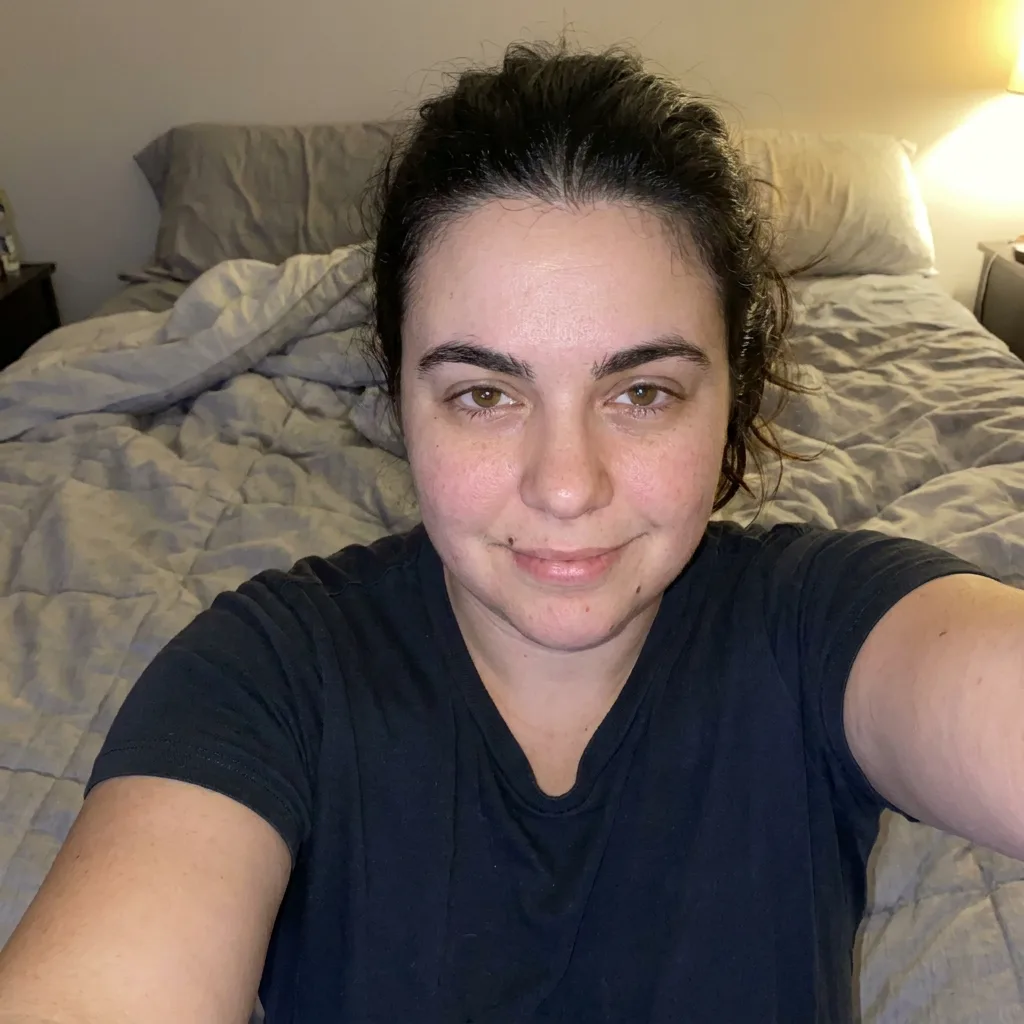

The one rule behind all of this
The AI builds your headshots from what it can see in your photos. If it can see your face clearly — your eyes, your smile, the shape of your face, your usual hair — it has plenty to work with. If your face is half in shadow, hidden behind sunglasses, or smoothed flat by a filter, it has to guess, and guessing is where strange results come from.
So every tip below serves the same goal: show your real face, clearly, more than once, in good light.
Light: the single biggest difference
Light matters more than your phone, your angle, or anything else.
Quick test before you take the photo: can you see both of your eyes clearly, with no dark shadow across either side of your face? If yes, the light is good enough.
- Best light: soft daylight from a window. Stand facing a window during the day, so the light falls evenly on your face. Not with the window behind you — that turns you into a dark shape.
- Good enough: a bright room. If there is no window light, use a well-lit room and face the main light. Avoid a single harsh light directly above you, which puts deep shadows under your eyes and chin.
- Avoid: dark rooms, night-time flash, and strong sun. Direct sun makes you squint and casts hard shadows across your face. A dark photo hides the details the AI needs.
The 5-photo plan
Most guides say "upload 10 to 20 photos." Headshotsly works from up to 5 selfies, so here is a plan for exactly 5 — each one doing a different job. If your tool takes more, add extra versions of the same five ideas.
Take each one in good window light, with a plain background if you can — a plain wall beats a busy room. Wear a plain, solid-coloured top, and wear your usual glasses if you normally wear them. Keep your usual hair and facial hair: the photos should look like you on a normal day, not like you dressed up for a special occasion.
- Photo — What to do — Why it helps
- 1. Straight on, slight smile — Face the camera directly, head straight, look at the lens, relaxed slight smile — This is the main reference — the closest to a finished headshot
- 2. Straight on, neutral — Same as photo 1, but with a calm, neutral face — Shows your face without a smile, so results stay accurate when you are not smiling
- 3. Slight turn one way — Turn your head a little to one side — not a full profile, just a gentle three-quarter turn — Your face is not perfectly even on both sides, and this shows the AI both sides
- 4. Slight turn the other way — Same gentle turn, to the other side — Completes the picture from photo 3
- 5. Natural smile, a little further back — A real smile, framed from the chest up, in a different room or different light — Shows your smile and your face in different light, so results do not all look like one sitting
Pick your 5 from your camera roll
You may already have the photos you need and not have to take any new ones. Go through your recent photos and pick five that pass this test:
Skip group photos cropped down to just you — the crop is usually too small and too blurry. Skip old photos from years ago, even good ones: if your hair, weight, or glasses have changed, the headshots will show the old you.
- Taken in the last year or so — you should still look like this today.
- Your face is clear, well-lit, and not covered by sunglasses, a hat, hands, or another person.
- No heavy filter, no beauty mode smoothing your skin, no face-changing effects.
- A mix, not five copies of the same shot: different days, different light, at least one smile and one neutral face, at least one slight turn.
What to do if you only have 1 or 2 good photos
Do not wait until you have a perfect set. Two honest options:
What does not help: uploading the same photo five times, or adding blurry, dark, or filtered photos just to fill the set. Bad photos do not cancel each other out — they drag the result down.
- Take three more now. The 5-photo plan above takes about ten minutes with a window and a phone. This is the better option, and it is quick.
- Start with what you have. One or two clear, recent, well-lit selfies are a far better starting point than five poor ones. Try the free option first, look at the result, and if it does not look like you, take better selfies and try again with those.
Phone settings: two small things
You do not need to learn photography. Two settings are worth checking:
- Turn off beauty mode or auto-retouching. Many phones smooth skin, slim faces, or enlarge eyes by default. That changes your face before the AI even sees it. Turn it off for these photos.
- Use the back camera if someone can take the photo for you. The back camera is usually sharper than the front one. If you are taking them yourself, the front camera is fine — good light matters more than which camera you use. Portrait mode is optional; a normal photo in good light beats a portrait-mode photo in bad light.
Common mistakes (and the fix for each)
- Sunglasses, hats, or hair across your face. Fix: nothing covering your face at all. Push hair back so your full face shows.
- Filters or heavy editing. Fix: upload the plain, unedited photo. The AI adds the professional look — it cannot undo a filter that already changed your face.
- Dark or yellow indoor light. Fix: move to face a window in daylight. One minute of moving beats any amount of editing later.
- Photos that are years old. Fix: take new ones. Ten minutes now saves a headshot that looks like a younger you.
- All five photos nearly identical. Fix: vary them — different days, different light, a smile and a neutral face, a slight turn each way.
- Group photos cropped tight. Fix: take a proper head-and-shoulders photo instead. Crops lose detail and go blurry.
- Too far away. Fix: head and shoulders should fill most of the frame, with a little space above your head. The AI needs your face large and clear, not small in the middle of a room.
Before you upload: 30-second checklist
If a photo fails one of these, swap it for a better one before uploading. Thirty seconds here is worth more than any fix afterwards.
- All photos recent — I still look like this today
- Face clear in every photo — no sunglasses, hats, hands, or hair in the way
- Good light — both eyes visible, no dark shadow across the face
- No filters, no beauty mode, no heavy editing
- A mix — not five copies of the same shot, at least one smile and one neutral
- Usual glasses, usual hair — the everyday you
Trying it with Headshotsly
Headshotsly works from up to 5 selfies. You get one full-HD photo free, with no watermark. If you want more, the full set is five 4K photos for a one-time $4.99, and it takes about 2 minutes.
So the cheapest way to test your selfies: upload your best 5, try the free photo, and look at it with fresh eyes. Does it look like you? Would someone who knows you recognise you at once? If yes, your selfies did their job. If not, the fix is almost always better selfies — go back to the checklist, retake the weakest ones in window light, and try again.
Frequently Asked Questions
It depends on the tool. Some ask for 10 to 20. Headshotsly works from up to 5, so five good ones — varied as in the plan above — are enough. Quality beats quantity: five clear photos beat twenty blurry ones.
Only if you still look like that today. If your hair, glasses, or face have changed since the photo, take new ones instead.
Include both. A slight smile and a neutral face give the AI both versions of you, so your headshots look right whether the finished photo smiles or not.
No. A modern phone in good window light is enough. Light and a clear face matter far more than the camera.
Wear them in your selfies if you normally wear them. The finished headshots should show the everyday you, glasses included.
No — upload the plain photo. Filters change your features, and the AI builds from what it sees. Start with your real face.
Almost always, the selfies. Dark, blurry, filtered, or all-identical photos are the usual cause. Retake them in window light, vary them, and try again.
Related Pages
Check the likeness yourself
Make one free photo from your selfie. If it doesn't look like you, you've lost nothing.