Corporate Headshot Examples: What Good Ones Have in Common
Good corporate headshots follow the same recipe: a head-and-shoulders crop, a plain background, soft even light, work clothes and a relaxed face.
That sounds plain, and it is on purpose. A corporate headshot does not need to be interesting. It needs to show a clear, friendly face that looks like you on the day someone meets you.
Below are three before/after examples, what good examples have in common, which look fits which page, and how to keep a whole team's photos matching.
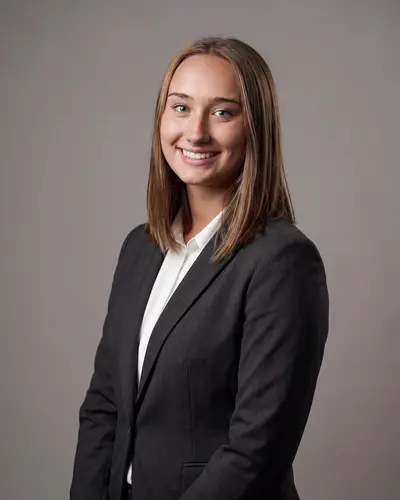
Corporate headshot example: a selfie to a dark blazer
Example made with Headshotsly from this one phone selfie: dark blazer, white shirt, plain gray background, soft light.


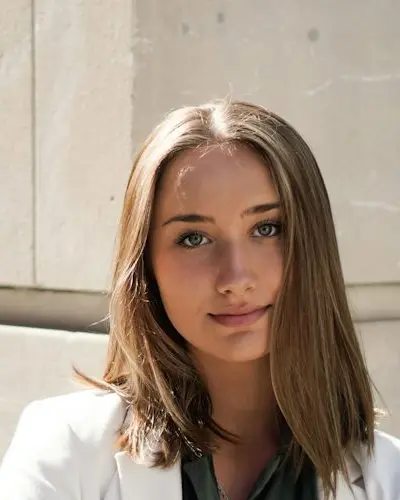
Business headshot example: a black blazer on gray
Example made with Headshotsly from one photo of a young woman in a white blazer. The black blazer and plain gray background were picked in the style.
Casual headshot example: an open collar in a bright office
Example made with Headshotsly from one photo of a man in a black suit. The beige shirt and bright office show the smart casual version of the same recipe.


The five ingredients of every good example
Good corporate headshot examples share five choices:
- Crop: head and shoulders, eyes in the top third of the frame, a little space above the head
- Background: one neutral tone — gray, white, or a soft brand color — identical across the team
- Lighting: soft and even, no harsh side shadows, no on-camera flash bounce
- Attire: business or business casual, solid colors, no loud patterns fighting the face
- Expression: relaxed, eyes on the camera, a soft smile rather than a forced one
What makes team pages look bad
The problem is rarely one bad photo. It's photos that don't match: one person in an old studio portrait, the next in a cropped conference photo with half a lanyard, a third in front of their kitchen cabinets.
Each photo may be fine on its own. Side by side on one page, they look like they came from different companies.
Not a suit team? Same recipe, one substitution
If your team doesn't wear suits, the recipe still works with one change: the clothes should match how clients and colleagues really meet you. In Headshotsly that means Smart Casual (an open-collar shirt) or Sweater instead of Navy Suit, as in the third example above.
Matching still matters most. A team page that mixes suits, hoodies and polos looks like three companies sharing one website. Pick one dress code for everyone.
Business headshot examples: which look for which page
These are the outfit and background names you see in Headshotsly when you pick LinkedIn & work. If your company has a brand guide for photos, follow it first: rules differ from company to company, so check yours.
- Leadership or about-us page: Navy Suit or Charcoal Suit on Clean Gray. Same outfit and background for every person on the page.
- Team directory, Slack and email: Blazer on Clean Gray or Pure White. Small photos need a plain background and a face that fills the frame.
- Company site with a relaxed dress code: Smart Casual or Sweater on Modern Office, like the third example above. See tech headshots for the no-suit version.
- LinkedIn: Blazer on Clean Gray or Light Blue. More on the outfit and background choices in LinkedIn headshots.
- Sales, founders and client-facing roles: Blazer on City Street or Modern Office. See business headshots for owners and freelancers.
- Photos at work for the website: the Marketing Shots At Your Desk, Client Meeting, Team Meeting and Speaking on Stage. The room and the other people are made by AI, so never present one as a real meeting or a real client.
How to reproduce the good examples at scale
The traditional route: book a photographer for a company day, pay per person, and accept that every new hire will break the set until the next session. In the US, a studio headshot session costs about $250 (median), and most cost $300-$550 (Photography Shark, May 2026). Group days are usually priced per person, below that.
The AI route: each person uploads one selfie, and you pick the same outfit and background for everyone, so the photos match. A new hire can get a photo in the same style the day they join. Each photo costs 1 credit, and a pack is $4.99 for 5 photos, paid once. In Headshotsly, start a team in your account and add each person; each one gets a private upload link. Each person needs one pack.
Want to see it on your own face first? Try one free photo, or browse more headshot examples for every job. For the background choice alone, read how to pick a background color.
Frequently Asked Questions
Head-and-shoulders crop, neutral consistent background, soft even lighting, solid-color business attire, and a relaxed engaged expression. The same recipe repeated across the whole team.
Solid colors in business or business-casual style. Avoid loud patterns and logos. If your team doesn't wear suits at work, a clean smart-casual look photographed the same way works too.
There is no fixed schedule: update when someone's look has changed enough that people would not know them from the photo (see how often to update your headshot). With AI, a new photo takes about 2 minutes, so an old photo is easy to replace.
Define one style (background, attire, crop) and generate every headshot with it. In a Headshotsly team, each person uploads a selfie via a private link and you make their photos in that same style, so they match the set.
Related Pages
Copy the formula in two minutes
One selfie per person, one matching style for the whole team. Try one free photo and see the recipe on your own face.